

 简体中文
简体中文

GeeTest CAPTCHA v4 Overview
Overview
Introduction
GeeTest CAPTCHA v4 is a next-generation human verification solution designed to distinguish genuine users from automated bots through advanced behavioral analysis, environmental detection, and interactive challenges. It offers a wide variety of user-friendly verification methods such as sliding puzzles and image selection. Commonly applied to high-risk scenarios including account registration, login, SMS delivery, and file downloads, GeeTest CAPTCHA v4 helps enterprises effectively block malicious traffic, safeguard user accounts, and reduce operational costs.
Key Features
Flexible Verification Modes
- Intelligent Verification Mode: Configure multiple challenge types in the GeeTest console. The system automatically selects the most suitable challenge based on risk signals.
- Risk Fusion Mode: Enterprises decide which challenge type to display by integrating risk strategies into their business logic and notifying GeeTest via API.
- Invisible Probe Mode: Provides frictionless protection without displaying a challenge. Risks are assessed in the background based on behavior and environmental signals, with the results returned to the business via API.
Diverse Challenge Types
GeeTest CAPTCHA v4 offers different verification types: Slide Puzzle, Icon Selection, Match-Three, Gobang, and OneTap Pass. For inclusivity, it also supports accessibility-friendly voice verification. This variety enables enterprises to balance user experience and security needs flexibly.
Customizable User Experience
- Custom Image Libraries: Upload enterprise-specific image sets to replace default backgrounds for puzzle or click-based challenges. Approved custom libraries are applied directly online.
- Interface Personalization: Tailor the overall interface with branded themes, custom colors, and light or dark modes to match enterprise design requirements.
Advanced Data Insights
The management console provides multidimensional reports across traffic, security, and user experience. Enterprises can track verification trends, monitor performance, and investigate suspicious activity with built-in log search capabilities.
Global Coverage & Compliance
- Multi-language: Supports 78 languages worldwide.
- Global Clusters: Data centers in North America, Europe, Japan, Singapore, and more.
- Data Compliance: Customizable data storage options to meet local compliance and privacy requirements.
Product Advantages
Reliable Service & Support
- Dedicated communication channels with 24/7 technical support.
- Experienced security teams specializing in automated attack prevention.
- Proactive monitoring of evolving attack techniques with rapid response and countermeasures.
Multi-Layered Protection
- Dynamic Challenge Updates: Hourly image library updates and multiple challenge variations prevent brute-force and model-based cracking.
- Proprietary Anti-Cracking Technology: Self-developed protocols with one-click updates to detect and block interface reverse-engineering attempts.
- Comprehensive Environment Detection: Identifies automated tools, malicious plugins, and incognito mode usage to filter out non-human requests.
Product Recommendations
Preparation
Public and Private Key Management
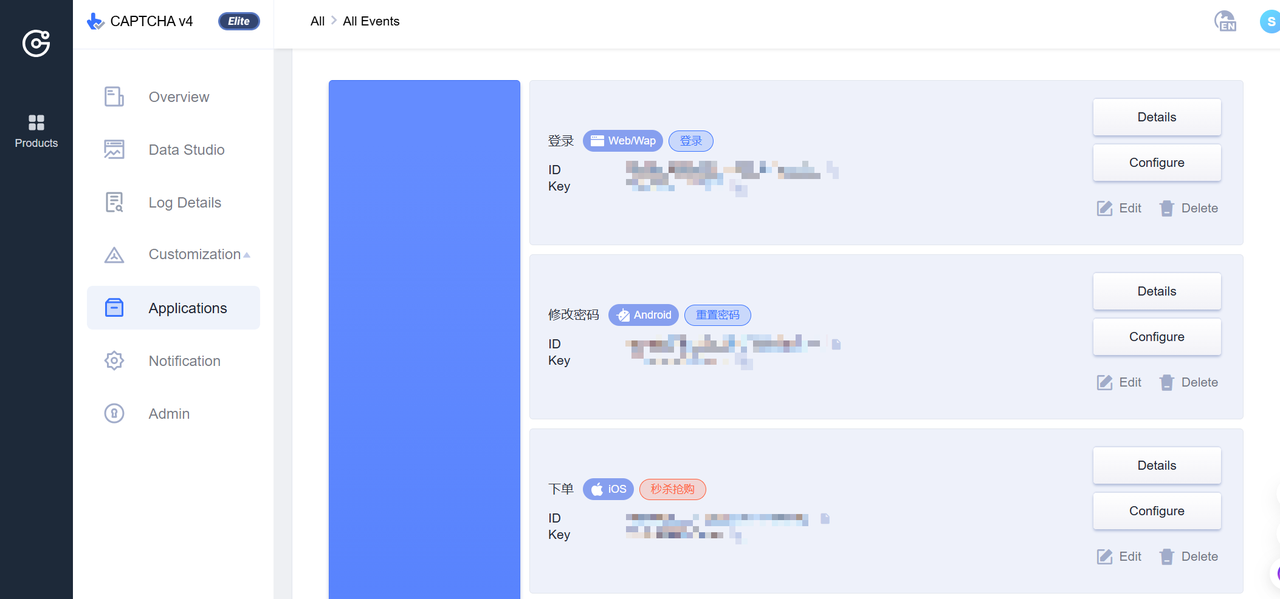
Before starting formal integration, please log in to the product console to create and obtain your ID and Key.
It is recommended to generate separate IDs and Keys for different business scenarios and client endpoints. This makes it easier to distinguish data, monitor results by scenario, and fine-tune strategies accordingly.
For testing purposes, a single set of ID and Key can be used across all cases. In production, you may also choose to use the same ID and Key for multiple scenarios or endpoints. However, this approach will prevent you from isolating data or adjusting strategies for individual scenarios or client endpoints.
Integration
JavaScript Integration Options
The core scripts gt4.js and the offline fallback bypass.js are rarely updated. You can download them and host them on your local CDN for loading. Other JavaScript files may be updated as needed, so it is not recommended to host them locally.
gt4.js: https://static.geetest.com/v4/gt4.js
bypass.js: https://static.geetest.com/v4/bypass.js
Disaster Recovery and Fallback Handling
Since client and server requests communicate with GeeTest servers over the public internet, occasional failures may occur due to network issues or force majeure. It is recommended that enterprises implement disaster recovery measures to minimize the impact of request failures.
- Affected Requests: Client load requests and server validate requests.
- Trigger Condition: The fallback process is triggered when the HTTP status code of a request is not 200.
- Deployment Guidance:
- Client-side: No additional deployment is required; the JS and SDK already include built-in fallback logic.
- Server-side: Ensure that validate requests handle non-200 HTTP responses appropriately, allowing pass-through when necessary.
- Additional Safeguard: On top of GeeTest’s built-in fallback mechanism, enterprises can implement a custom verification switch to control when CAPTCHA challenges are enabled or disabled.
Deployment and Usage
In a production environment, the selection of verification methods plays a key role in overall security. Each method provides a different level of defense against automated attacks, allowing businesses to dynamically tailor the verification approach based on specific scenarios and operational requirements.
Verification Method Selection
In a production environment, the choice of verification method is a critical factor in determining overall security. Different methods provide varying levels of resistance against automated attacks, and businesses can dynamically adjust the approach based on specific scenarios and requirements:
- One-Click Pass: Provides no blocking capability and is used solely as a risk identification mechanism.
- Slide Puzzle, Match-Three, Gobang: Offer limited security protection, making them suitable for scenarios where user experience is prioritized.
- Text Selection, Sequence Selection: Deliver moderate security protection, for example through features such as dynamically updated image libraries.
- Icon Selection, Nine-Grid Selection: Provide strong security protection with customizable styles of varying complexity, supported by dynamically updated image libraries. However, they require greater user understanding and judgment, which may impact the overall user experience.